Soon Coming to iPhone · free to start

Your screenshots, finally on shelves.

Memora reads the screenshots and links you save — books, recipes, places, receipts, tickets — and files each one onto the right shelf as a tidy card. All of it on your phone.

Photos never leave your phone No ads, no trackers Sorting works offline
Memora's home screen: 17 cards across 10 shelves, a search bar, and a “For you” card with two books on the reading list.
Books Recipes Places Quotes Products Bills & Receipts Movies & TV Music Design Ideas Apps & Tools Tickets & Bookings People & Contacts Articles & Links Fitness Codes & Passwords Health Chats Memes & Fun Notes & To-dos
The big tidy-up

From camera-roll chaos to shelves you’ll actually open.

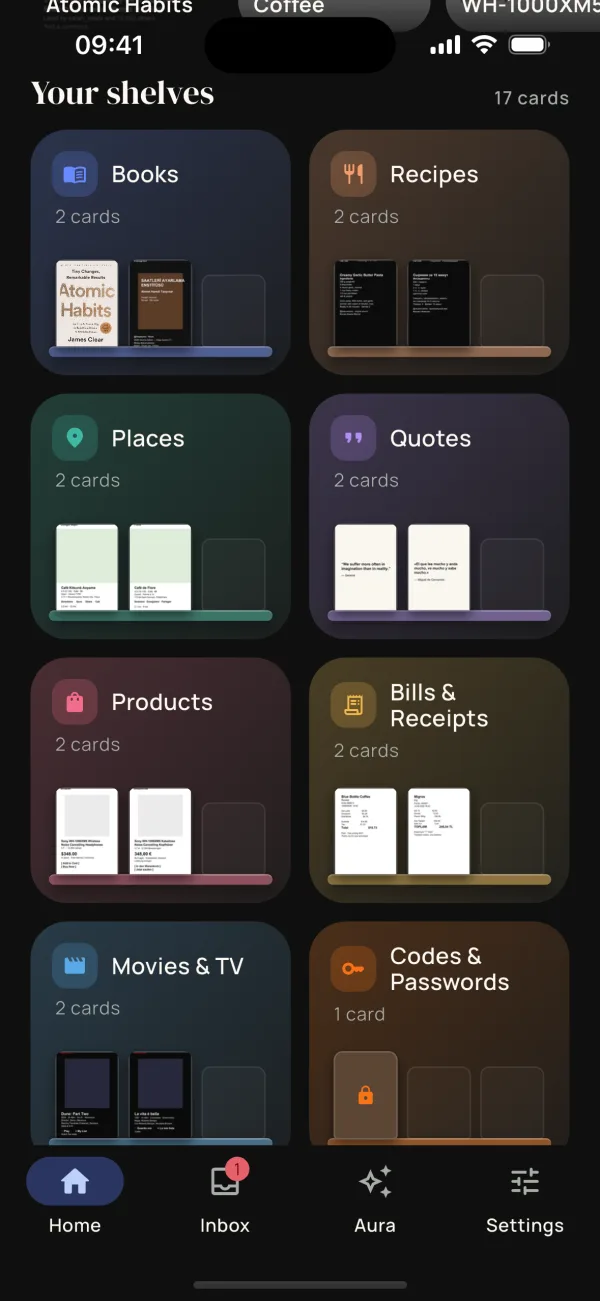
Memora's shelves: Books, Recipes, Places, Quotes, Products, Bills & Receipts, Movies & TV and Codes & Passwords.
How it works

Save things the way you already do. Memora does the filing.

Screenshot or share

Keep taking screenshots, or tap Share in any app and pick Memora. There’s no new habit to learn.

Read on your phone

Text recognition built into your phone reads each screenshot on the device. The image itself is never uploaded.

Filed as a card

It lands on the right shelf with the useful parts pulled out: author, address, ingredients, date. If Memora isn’t sure, it waits in your Inbox.

Inside Memora

A library of everything you meant to come back to.

Home

A home screen that remembers for you

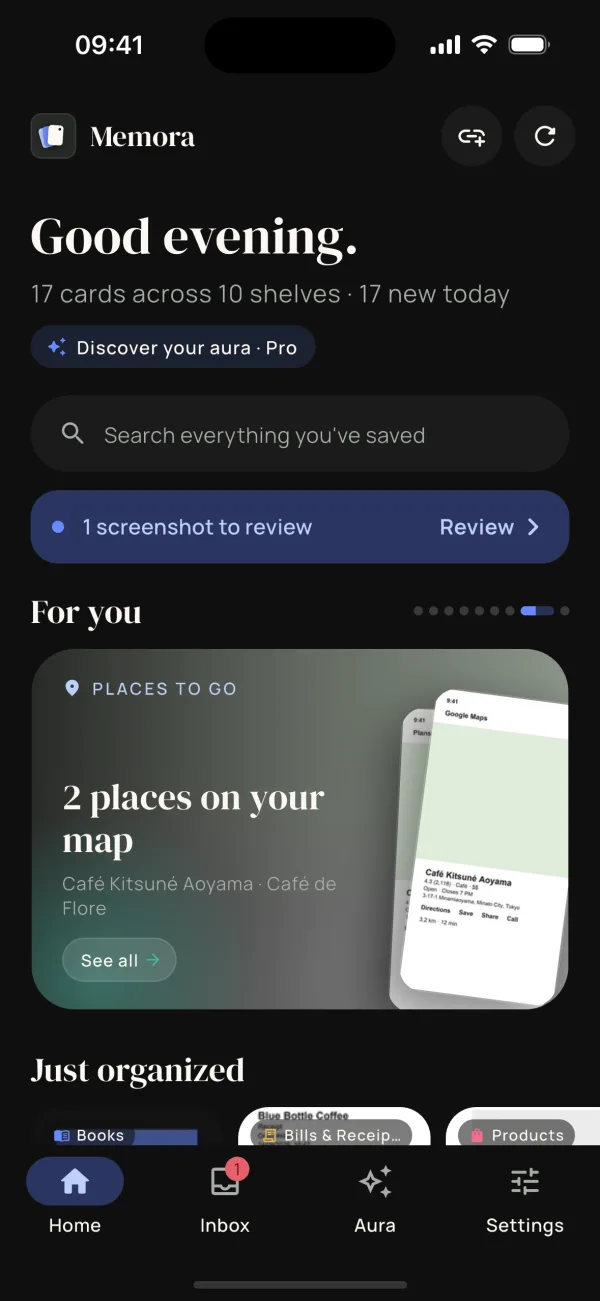
See what you saved today, what’s waiting in your Inbox, and a “For you” row that brings back the books on your list and the places you wanted to go.
  • For you
  • Just organized
  • Search everything
Memora's home screen with a “For you” card: two places on your map.
Shelves

Shelves that fill themselves

Books, Recipes, Places, Receipts, Movies and more. Each shelf shows its cards on a little ledge, ready to browse. You choose how bold the auto-filing is.

  • 20 shelves
  • Bold · Balanced · Ask me
  • Inbox for the unsure ones
Memora's shelves: Books, Recipes, Places, Quotes, Products, Bills & Receipts, Movies & TV and Codes & Passwords.
Cards

Cards, not clutter

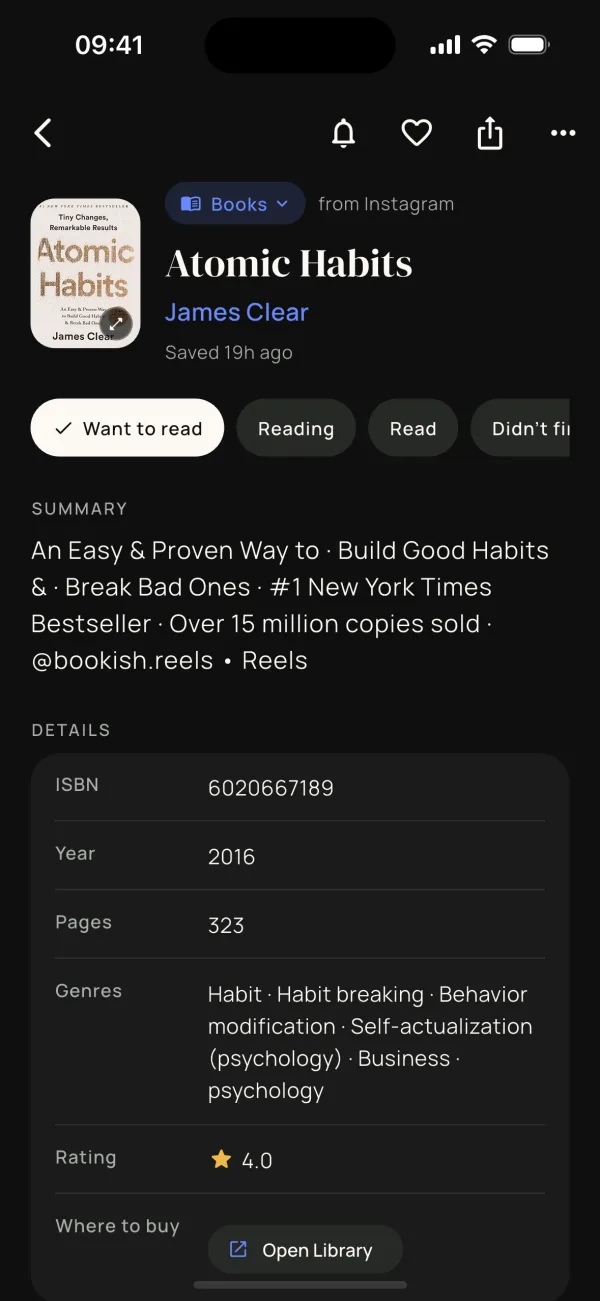
A screenshot of a book becomes a card with the author, year, pages, genres and a short summary, plus a status you can track: Want to read, Reading, Read.
  • Summaries
  • Details looked up for you
  • Your own notes
A book card for Atomic Habits by James Clear with a summary, ISBN, year, pages, genres and rating.
Places

Every place, on a map

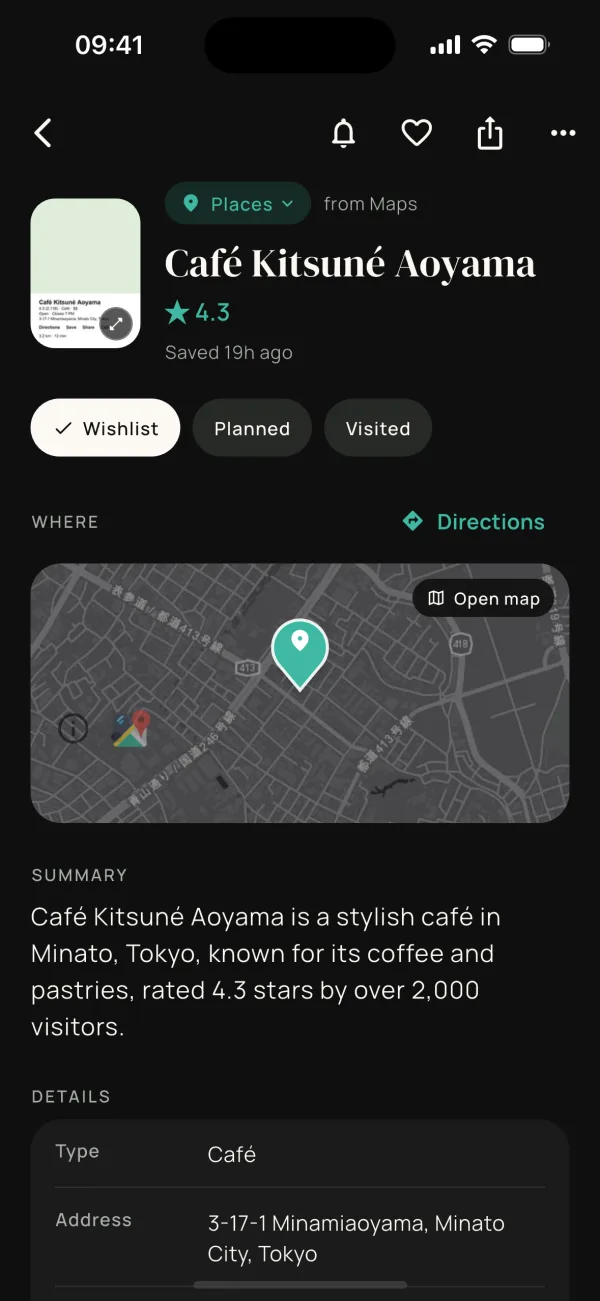
Cafés and spots from screenshots and Maps links get a rating, an address and directions, and show up together on your map. Wishlist, Planned, Visited.
  • Map view
  • Directions
  • Visited list
A place card for Café Kitsuné Aoyama with a 4.3 rating, a map and the address.
Recipes

Recipes you’ll actually cook

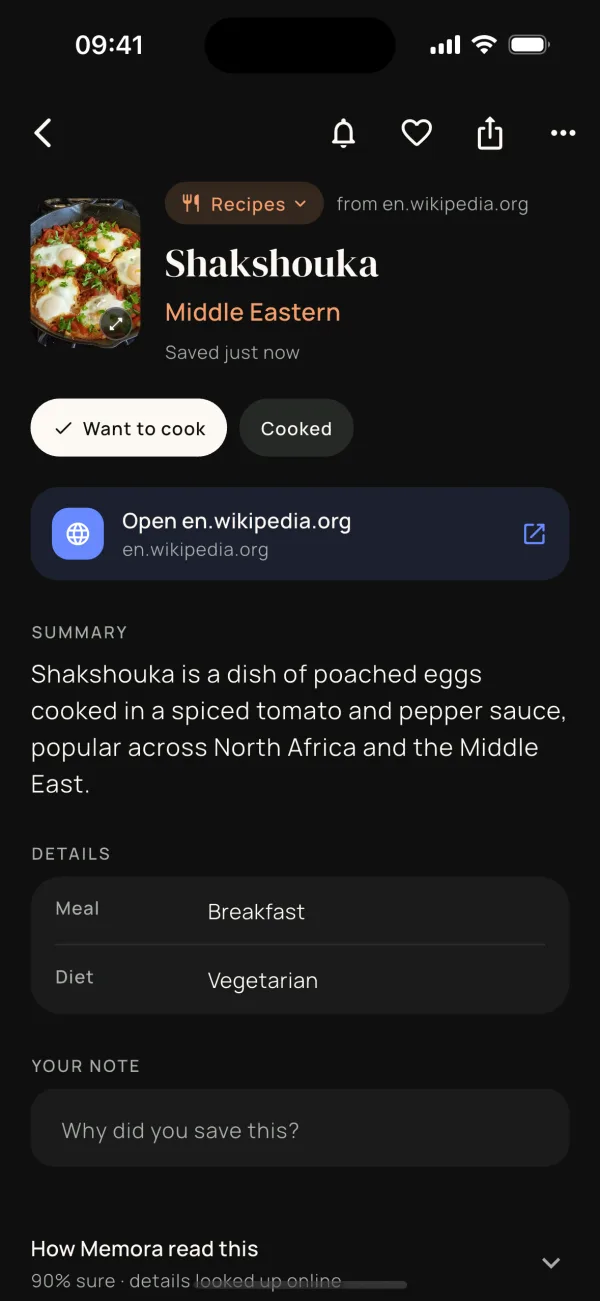
The dish, the cuisine, a short summary and a link back to the source. Mark it Want to cook, then Cooked, and add a note on why you saved it.
  • Meal & diet
  • Source link
  • Why you saved it
A recipe card for Shakshouka, a Middle Eastern breakfast, with a summary and a note field.
Share

Share from any app

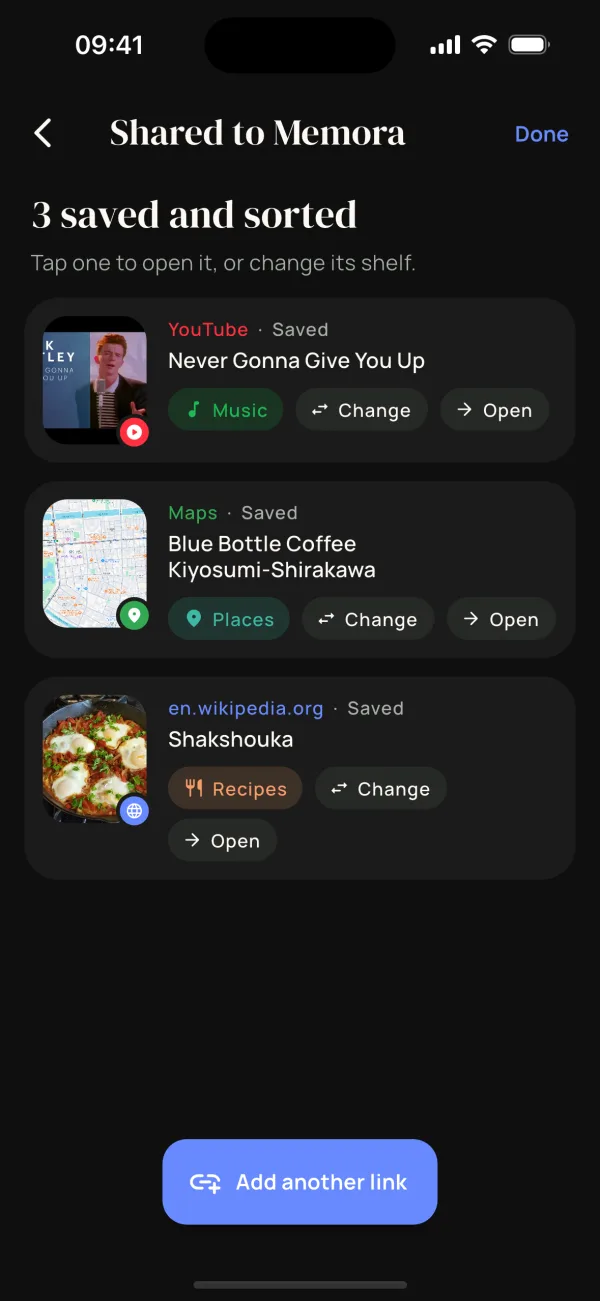
Tap Share in Instagram, TikTok, YouTube, Maps or your browser and choose Memora. The link is read, named and put on the right shelf in seconds.
  • Reels & posts
  • Maps pins
  • Any web link
“3 saved and sorted”: a YouTube song filed to Music, a Maps pin to Places and a Wikipedia recipe to Recipes.
Twenty shelves

A shelf for everything you screenshot.

Memora starts with twenty shelves, from Books to Bills. Two of them are Vaults: what goes there never leaves your phone.

BooksAuthor, year and pages, plus where you are in it.
RecipesThe dish, the cuisine and a note on why you saved it.
PlacesRating, address and directions, all on a map.
QuotesThe lines worth keeping, and who said them.
ProductsThings you’re eyeing, with the price you saw.
Bills & ReceiptsTotals, dates and where you paid.
Movies & TVWhat to watch next, with the year and a summary.
MusicSongs, albums and artists you meant to play.
Design IdeasPalettes, layouts and rooms you loved.
Apps & ToolsApps and services worth a try.
Tickets & BookingsFlights, events and reservations, with a reminder the day before.
People & ContactsProfiles and contact details to follow up on.
Articles & LinksReads for later, from any site.
FitnessWorkouts and routines to try.
VAULTCodes & PasswordsWi-Fi codes and logins. Never sent anywhere.
VAULTHealthPrescriptions and results. Never sent anywhere.
ChatsConversations worth remembering.
Memes & FunFor when you need to find that one meme.
Notes & To-dosLists, reminders and scribbles.
UncategorizedAnything else, until you decide.
Private by design

Your photos never leave your phone.

Memora does its reading on your device. When it looks something up online, it sends a few words, and anything personal is masked before they go.

What a look-up sends
Screenshot of a chat
You HAVE to read Atomic Habits by James Clear Call me after: +1 415 555 0132 or write to sam@example.com Door code on Saturday is 482913
Read on your phoneThe text is recognised on the device. The image stays in your photo library.
Masked before it leavesPhone numbers, emails, codes, card numbers and IBANs are replaced: <phone> <email> <code>
Back comes a cardAtomic Habits · James Clear, filed on Books with its details filled in.
Read on your deviceText recognition runs on the phone itself. Images are never uploaded: not to us, not to anyone.
Vaults stay homePasswords, codes and health screenshots go to a Vault that’s never sent online, never previewed and kept out of widgets. Card numbers or passwords in a screenshot send it there automatically.
Offline when you wantSwitch off online look-ups in Settings and Memora runs entirely on your phone.
No ads, no trackersNo advertising IDs, no analytics kits, and your data is never sold. You don’t even need an account.
Read the full privacy policy
Your aura · this month

The Explorer

You save places, restaurants, travel ideas, maps and things you want to experience.

Explorer38%
Foodie24%
Learner18%
Planner12%
Collector8%
Today’s nudge: pick one saved place and put a date on it this week.
Aura Pro

What do your screenshots say you’re into?

Aura reads the pattern in what you save: your type this month, your mix, a nudge for today, and the things you meant to get back to. It’s worked out on your phone and describes your interests, never who you are.

  • Explorer
  • Learner
  • Builder
  • Curator
  • Planner
  • Shopper
  • Creator
  • Collector
  • Foodie
  • Dreamer

Share your aura as a card with your type and mix. It never shows your screenshots or what you saved.

Widgets & nudges

Your library, one glance away.

Home Screen widgets and gentle reminders bring back what you saved when it’s useful. Vault cards never appear in them.

Coming up
Fri · Concert tickets
Sun · Flight to Lisbon
Oct 3 · Electricity bill

Coming up

Daily quote
“We suffer more often in imagination than in reality.”
Seneca

Daily quote

Up next
Atomic Habits
Dune: Part Two
Café de Flore
Shakshouka

Up next

Inbox
3
screenshots waiting for a shelf

Inbox

Also: Rediscover, a screenshot worth a second look, and Aura for Pro.

Daily nudgeOne line a day: advice for your aura, or a small thing to do with what you saved.
Inbox remindersWhen screenshots are waiting for a shelf.
Upcoming eventsThe day before a saved ticket, booking or bill that carries a date.
Sunday recapWhat you meant to get back to, once a week.
Pricing

Free to start. Pro when you want more.

Sorting, shelves, cards, search and sharing are free. Pro adds Aura and picks for your shelves.

Free

Organize on your phone, privately.

$0forever

  • Screenshots sorted onto 20 shelves
  • Cards with details, search and a map
  • Share links from any app
  • Inbox review and Vault
  • Home Screen widgets
7 days free

Pro

Every screenshot, fully understood.

$29.99/ year

Just $2.50 a month, after a 7-day trial

  • Everything in Free
  • Aura: your type, mix and daily nudge
  • “You might also like” picks for your shelves
  • The Aura widget
  • New Pro features as they arrive
Early adopters

Lifetime

Pay once, keep it forever.

$79.99$119.99

One payment, no renewal

  • Everything in Pro, for good
  • All future Pro features
  • No subscription to manage

Prices in US dollars; taxes may apply. Payments are handled by Stripe. Cancel any time in the app and keep Pro until the period ends.

Questions

Good to know.

Does Memora upload my screenshots?

No. Screenshots and photos are read on your phone and stay in your photo library. Memora never uploads images, to us or to anyone else.

So what does go online?

With online look-ups on, Memora sends a few lines of text from a screenshot, with phone numbers, emails, codes, card numbers and IBANs masked, so it can name the book, place or recipe and fill in the details. Links you share are sent so Memora can read the page’s title and preview. You can turn look-ups off in Settings → Privacy. The privacy policy lists every service involved.

Do I need an account?

No. You can use Memora as a guest. You only need an account (Apple, Google or email) to buy Pro, so your plan follows you to your other devices.

Which apps can I share from?

Any app with a Share button: Instagram, TikTok, YouTube, Facebook, X, Pinterest, Reddit, Spotify, Google Maps, Apple Maps, Safari and many more. Pictures you share are added to your photo library and sorted along with your screenshots.

What happens to passwords and health information?

They go to a Vault shelf. Vault cards are never sent anywhere, never previewed on your shelves, and never shown in widgets or recommendations. If Memora spots things like card numbers, IBANs or passwords in a screenshot, it puts it in the Vault automatically.

Is there an Android version?

Memora is launching on iPhone first. An Android version is in the works.

How do I cancel Pro?

In Memora, open Settings and tap Manage on your plan. Stripe’s secure page lets you switch plans, update your card or cancel. You keep Pro until the end of the period you’ve paid for. There’s one free trial per account.

How do I delete my account?

In Memora, open Settings, tap your profile at the top, then Delete account. It takes effect immediately. You can also ask us to do it by email.

Who makes Memora?

Memora is made by an independent developer who had far too many screenshots. Say hello at support@memorashelf.com.

Your screenshots deserve better than a camera roll.

Memora is coming soon to iPhone. Free to start, private by design.